Step 1:
Click on Start --> Run
Step 2:Type " excel " and click on "OK".
Click on Start --> Run
Step 2:Type " excel " and click on "OK".
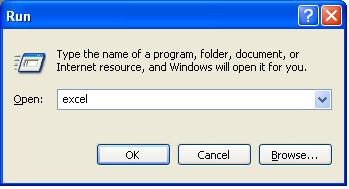
Now, Excel will open.
Click here for more Run Commands
Click here for more Run Commands


| Application | Run Command |
| Command Prompt | cmd |
| Microsoft Access | msaccess |
| Microsoft Excel | excel |
| Microsoft Frontpage | frontpg |
| Microsoft Powerpoint | powerpnt |
| Microsoft Word | winword |
| Firefox | firefox |
| Internet Explorer | iexplore |
| Control Panel | control |
| IP Configuration | ipconfig |
| Windows Movie Maker | moviemk |
| Paint | mspaint |
| Notepad | notepad |
| Paint | pbrush |
| Windows Media Player | wmplayer |
| Wordpad | write |